
ProjectsPersonal projects
Rastrojero
An off-road simulator in the browser with a 1971 Rastrojero modelled in Blender: vehicle physics with Rapier, WebGPU rendering and an edit mode to build your own test track.
- Status
- In progress
- Period
- 2025.09 — present
- Type
- Simulation
- Role
- Solo project, Physics and simulation, 3D modelling
- Technologies
- Three.js
- WebGPU
- TSL
- Rapier
- Blender
- Links
- Demo — off-road.vercel.app (opens in a new tab)
- Repository — github.com (opens in a new tab)
- Development log
- 24 entries
Context and goal
The Rastrojero is the utility pickup built in Argentina from the fifties on. I modelled the 1971 version in Blender and brought it into Three.js to drive it with real physics: suspension, rear-wheel drive and brakes.
The idea grew step by step: first the driving, then a terrain to test it and finally an editor so anyone can build their own track with cones, ramps, signs, barriers and a loading zone. The process is documented in the log below.
Demo
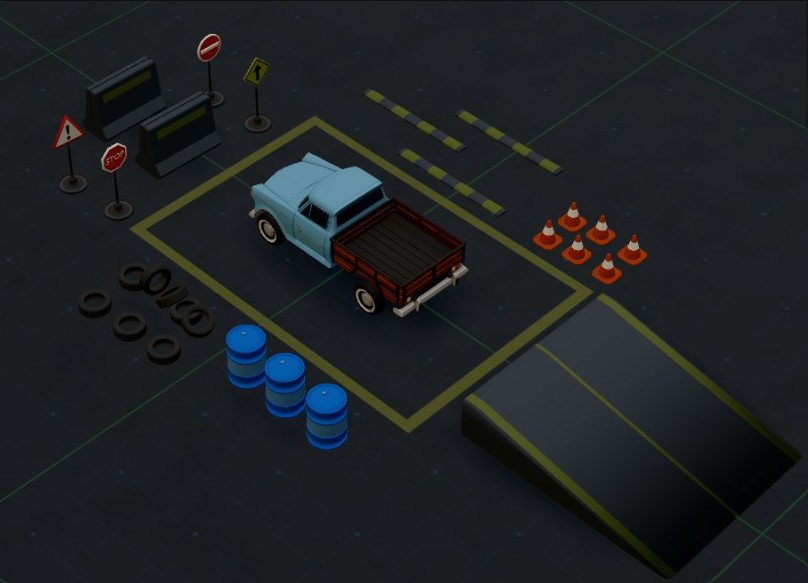
Driving: W / ↑ accelerate · S / ↓ reverse · A D / ← → steer · Space brake · B hazard lights · L lights.
Editing: turn on EDIT MODE in the top-right panel. Chrome or Edge are recommended (WebGPU); other browsers use WebGL2.
Technical description
- Vehicle: Rapier's
DynamicRayCastVehicleController, with four wheels, rear-wheel drive and brakes, and front steering (up to 30°, smoothed). The rear brakes lose strength in reverse, and releasing the throttle applies engine braking. - Colliders: the cab uses two convex hulls generated from the GLB, and the bed uses cuboids built in code, so it can work as a cargo bed.
- Rendering:
WebGPURenderer(with WebGL2 as a fallback), 4× MSAA on the scene pass, bloom for the lights and an adaptive resolution that lowers the pixel ratio when the frame rate drops. - TSL materials: the floor grid (with Dark, Contrast, Blueprint, Retro, Neon… presets), the border that marks the driving area and the loading zone. The concrete combines textures from tsl-textures.
this.controller.setWheelSuspensionRestLength(i, 0.7)\nthis.controller.setWheelMaxSuspensionTravel(i, 0.6)\nthis.controller.setWheelSuspensionStiffness(i, 85)
Edit mode
A Tweakpane panel controls the floor, the camera and the assets. Each asset is placed with a preview that follows the mouse and rotates in 22.5° steps with the wheel. Once placed, it is moved and rotated with a custom gizmo, and it has physics, so objects push each other while you edit.
The loading zone has a platform with 16 boxes. When the pickup's bed enters the zone, the light turns from red to green and the boxes can be dragged into the pickup. The layout is saved in the browser's localStorage.
Results and limitations
- Still in development.
- Tracks are saved per browser (
localStorage), so they cannot be shared. - The concrete barrier's collider still uses a convex hull.\n- Next up: surfaces such as water, dirt and mud that change the handling.
Credits
- Rastrojero model and assets: Pablo Mesquida (Blender).
- Rapier by Dimforge for the physics.
- tsl-textures by Pavel Boytchev for the concrete pattern.
- Tweakpane for the edit panel.
Development log
Configurable loading zone
The loading zone is set up with assets that can be dragged into the pickup.
Loading and unloading zone
A zone where the pickup can load the objects sitting on a pallet.
A new collider for the pickup
A convex hull for the front and four cuboids for the bed.
More accurate colliders for the assets
I adjusted the colliders of several assets so they follow the shape of the objects more closely.
Edit mode rebuilt, with new gizmos
I rebuilt several parts of edit mode and added new gizmos to move and rotate.
Saving the asset layout
Placed assets are now saved in the browser.
New assets: signs, tyres, barriers and speed bumps
New assets for the track and a zoomed-out view to place them.
Spawn bug fixed
After quite a while, the bug in the pickup's spawn is fixed.
Editing different assets
The panel supports different assets, the camera can be dragged and placed objects can be moved and rotated.
Edit panel
A panel to place cones and edit the floor and its limits.
The first objects: cones
Cones are the first asset of the test track.
Floor with grid and limits
The floor material adds the grid with presets and a shader that marks the limits of the driving area.
Steering tuned: the basics are ready
With the steering tuned, the basic driving is ready.
Ambient occlusion from Blender
I exported the ambient occlusion from Blender and I like the result better.
Rear brakes
Brakes that apply a different force depending on direction, and gentle braking when you release the throttle.
Lighting system
Headlights, brake lights, hazard lights and reversing lights working.
Materials and suspension with Rapier
Back in Three.js: the model's materials and a stable suspension.
Retopology: from 80,000 to 22,000 vertices
I rebuilt the model's geometry so it is lighter in the browser.
First test in Three.js
The Rastrojero model, now inside Three.js.
1971 Rastrojero in Blender
The finished model, for now: a 1971 Rastrojero made in Blender.
Bed, wheels and colour
Third progress update in Blender: the pickup gets the wooden bed, the wheels and the light-blue paint.
The cab takes shape
Second progress update in Blender: the cab gets materials, grille, headlights and bumper
Modelling the Rastrojero in Blender
With the physics working, I started modelling the pickup, beginning with the cab’s bodywork.
First steps: from a cube to a chassis on wheels
Where the Rastrojero started: testing the physics with Rapier before the model existed.